
The NE555 is an inexpensive timer IC that can be configured to run in monostable i.e a single stable state or in timer mode with the addition of a few passive components. It is very easy to use and configurable over numerous decades from a few miliseonds to several hours – although brief and long delays can be unreliable due to tolerances in the external passive components .
NE555 in the astable configuration
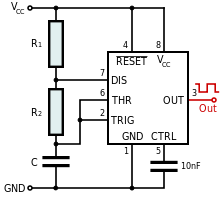
The circuit shown above shows the 555 configured as an astable multivibrator by selecting the values of R1, R2 and C1 the frequency of the oscillator can be configured.
The Clock out (pin3) frequency can be represented as follows:

Here’s a python script you can run to work out the component values. An approximate 1Hz oscillator can be obtained with R1=10KΩ, R2=10KΩ and C1=47μF
Python 2.6 NE555 timer calculator.
# 555 timer calculator
# Useful sites on the 555.
# http://freespace.virgin.net/matt.waite/resource/handy/pinouts/555/
# http://www.ohmslawcalculator.com/555_astable.php
#
# (C) G.P.Walker 25th March 2014.
# first calculation is for a Monostable
# second calculation od for an Astable
# next version move to give a choice and add further technical details - duty cycle etc
# Also look to do a parameteric sweep on the values so you can see how Fc is changed
# by altering the values as a paramater :)
#
# Notes:
# Increasing C will increase the cycle time (and hence, reduce the frequency).
# Increasing R1 will increase Time High, but will leave Time Low unaffected.
# Increasing R2 will increase Time High, increase time low and decrease the duty cycle (down to a minimum of 50%)
# This version supports the changes made in python3 to  the input function
# This version 30th October 2023

from os import *
system('clear')
print("NE555 timer circuit calculator")
print("(C) G.P.Walker March 2014 greg@gregwalker.me.uk")
print("")
print("1) Monostable:")
print("2) Astable:")
print("")
answer=(int(input("Enter a value for the type of circuit you want: ")))

if answer==1:
 print("")
 r=float(input("Enter the value of the resitor connected to Vcc and pin 6: "))
 c=float(input("Enter the value of the capacitor connected to pin6 and GND: "))
 t=(1.1*(r*c))
 print ("This circuit will produce a pulse of duration: %0.3f" %t + " seconds")

elif answer==2:

 print("")
 r1=float(input("Enter the value of r1 connected to Vcc and pin 7: "))
 r2=float(input("Enter the value of r2 connected to pin 7 and pin 6: "))
 c=float(input("Enter the value of c connected to pin 6 and GND: "))
 f=1.45/((r1+(2*r2))*c)
 print ("\nThis circuit will produce an square wave of: %0.3f" %f +" Hertz\n")
 print("Node connections for the astable are as follows:")
 print("Pin 1 to GND:")
 print("Pin 2 to Pin 6")
 print("Oscillator's output is on Pin 3")
 print("Pins 4 and 8 to Vcc:")
 print("Pin 5 to Gnd via a 10nF cap - or leave it floating\n")

