I’ve recently started to look at the *BSDs again. i have a love/hate repationship with FreeBSD which is now on a much more love basis as in the past a dirty shutdown would more often than not would lead to an fsck which screwed the whole system up. I’m not certain but I think they use a different filesystem now and it tends to be much more reliable even when it crashes in a desktop environment. Anyway, I wander as this is about OpenBSD but this issue will come back later!
So, first thing to do is to create a qcow2 filesystem
qemu-img create -f qcow2 OpenBSD.img 20Gwith that created initiate the VM
qemu-system-x86_64 -machine q35 -accel kvm -cpu host -m 4096 -smp 2 -vga virtio --full-screen -nic bridge,br=virbr0,model=virtio-net-pci -device intel-hda -device hda-duplex -bios /usr/share/ovmf/x64/OVMF.fd --hda ~/OpenBSD.img --cdrom ~/Downloads/install80.iso
I am not going to walk you through the installer, it is pretty intuitive for a TUI. The only change I made was to do a custom disk layout by selecting a GPT disk and then adding a root (/) partition first then a swap partition for the remainder of the disk. If you accept the defaults, you will run out of space installing kde-plasma and other applications.
OK, with that done you now want to add a few applications. Login as root and use the pkg_add command to install a few favorites for me this is nano and a basic plasma install.
pkg_add nano kde-plasmsaThis will take a few minutes so go and make a brew! Once complete enable the messagebus daemon and reboot
rcctl enable messagebus
reboot
Login back in as root and make a couple of configuration changes.
usermod -L kde myuserReplace myuser with your regular user account.
Now, without a complete debrief which will bore the hell out of you (background here) plasma will not start correctly. loads of locale errors, file handler errors, plasmashell core dumps, black screen and general plasma hell will prevent your session from running. I did ask for help on the fediverse and a few people did give some good pointers which are incorporated in my post, especially this one as it verified the behaviour I was seeing and that’s normally a good thing as I wasn’t going mad! but it did not resolve the problem. Details at the end of this post or you’ll never forgive me for wandering again.
Now that your user is in the KDE login class, I still found the limits a bit on the low side so I increased the limits as shown below.
nano /etc/login.conf/kde
kde:\
        :datasize=8192M:\
        :openfiles-cur=2048:\
        :openfiles-max=2048:\
        :tc=default:
This should now give you sufficient file handles to run plasma. now on to the .xinitrc file.
The following .xinitc file was put together using the pkg-install readmes for DBUS and kde-plasma in the /usr/local/share/doc/pkg-readme directory
.xinitrc
export LC_CTYPE=en_GB.UTF-8
export XDG_RUNTIME_DIR=/tmp/run/$(id -u)
if [ ! -d $XDG_RUNTIME_DIR ]; then
    mkdir -m 700 -p $XDG_RUNTIME_DIR
fi

if [ -x /usr/local/bin/dbus-launch -a -z "${DBUS_SESSION_BUS_ADDRESS}" ]; then
    eval `dbus-launch --sh-syntax --exit-with-session`
fi
kscreen-doctor output.556.enable
/usr/local/bin/ck-launch-session /usr/local/bin/startplasma-x11 > plasmalog.txt 2>&1
without the kscreen-doctor line this is the cause of all the nightmares I had over 2 days working on this problem. The core reason the standard script doesn’t work is that for whatever reason plasma doesn’t enable the default output device (all those no screens found errors etc) The number varies by OpenSBD version, root V normal user, if vgaaperture setting is enabled in sysctl.conf. To find your magic number just startx without the .xinitrc file and you’ll default to TWM and run the following command
kscreen-doctor -o
and make a note for the .xinitrc file. Now you’re ready!
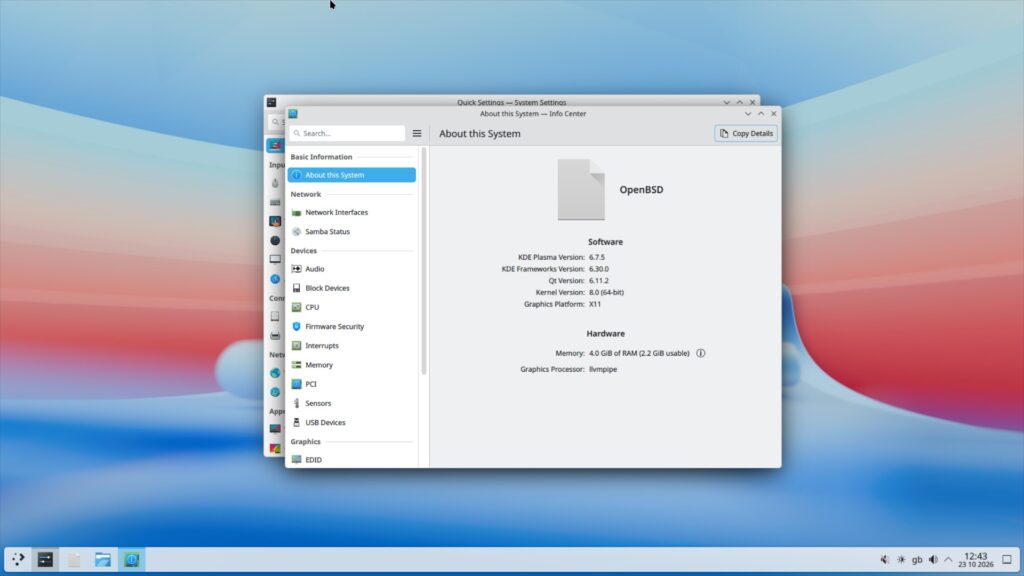
type startx and enjoy some wonderful plasam on OpenBSD on qemu!